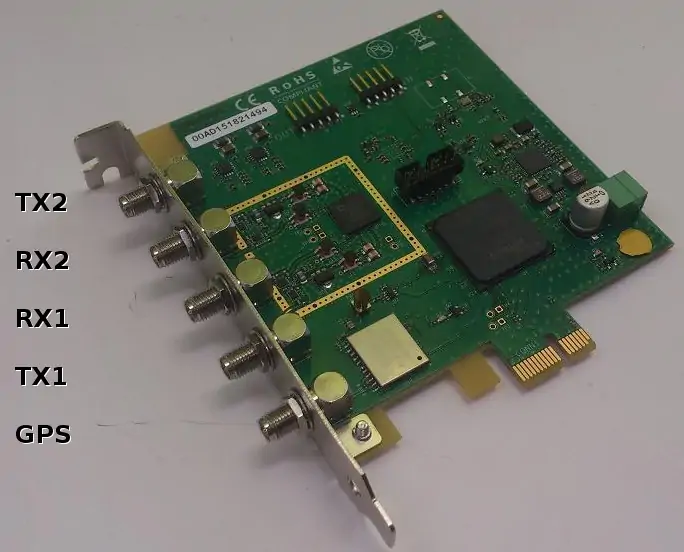
Figure 6.1
If you have bought the OTS (Off-The-Shelve) package, then you donât need to install anything. Everything has already been installed on your PC. Otherwise, please follow through the steps below.
Decompress the trx_sdr archive into a convenient directory specified by <trx_path>.
tar -xzf trx_sdr-linux-YYYY-MM-DD.tar.gz -C <trx_path>
You have two ways to install the TRX driver for the PCIe card:
For both cases, the installation requires some specific packages to compile the kernel module. To do this, you need to be root. In Fedora and Cent OS, you need to install kernel-devel, make, gcc and elfutils-libelf-devel packages by running the following command:
dnf install kernel-devel-$(uname -r) make gcc elfutils-libelf-devel
For Ubuntu, use the following command:
apt-get install linux-headers-$(uname -r) build-essential
Note that you’ll need equivalent packages for other Linux distributions if you do not use Fedora, Ubuntu or Cent OS.
Once you have finished the installation, you need to initialize (See Driver initialization) and upgrade your driver (See Firmware upgrade). Please make sure to initialize the driver after each system boot if you have not activates an automatic lte service.
Automatic installation is only available on Fedora, Ubuntu and CentOS distributions. Use manual install for other distributions. To start your automatic install, use the following command where <path> is the path to the directory where you have already installed your LTE component (eNB or UE) and type should be set to enb or ue accordingly.
./install <path> <type>
Notes:
To manually install the driver, let’s note <path> the directory where Amarisoft eNB or UE software is installed. Then:
cd kernel
make
cd ..
cp trx_sdr.so <path>
cp libsdr.so <path>
cp libc_wrapper_sdr.so <path>
cp -r <config_dir> <path>/config/sdr
Select frontend:
<path>/config/rf_select.sh sdr
Each time you boot your system, you need to perform this initialization. Note that if you are using OTS install, this step is already done by the lte service.
cd kernel
./init.sh
Perform the following command to upgrade your PCIe card:
./sdr_util upgrade
Notes:
To make several cards work together, they must be time and frequency synchronized. For that purpose you need to plug the provided black cable between each card. Connect the internal OUT connector (J4 on Figure 6.2) on the first card to the IN connector on the second card (J3 on Figure 6.2, connectors are between RoHS compliant mark and Serial number sticker). Then do the same with OUT of second card and IN of third one, etc...
When you install several PCIe cards, the mapping between the PCI connectors and the Linux devices is not predictable (but it shouldn’t change after each boot). To identify the order please do the following:
./sdr_util -c 0 led 1
Then check inside PC on each board, one of them should have a led blinking. This is card 0 (/dev/sdr0).
Switch off the led:
./sdr_util -c 0 led 0
You can do the same for other cards:
./sdr_util -c <n> led 1
Where <n> is the index of the card.
To use all the cards, update eNB config file (config.cfg) using args parameter:
args: "dev0=/dev/sdrA,dev1=/dev/sdrB,..."
Note: this allow to change the order of the cards. For instance, if your card are from left to right have following indexes:
<1> <2> <0>
And you want first cell to be on left, second cell to be on middle and third on right, use the following:
args: "dev0=/dev/sdr1,dev1=/dev/sdr2,dev2=/dev/sdr0"
The default TRX configuration used by your component is called config.cfg. It could be found under the directory config/sdr/ of your component (eNB or UE).
The following JSON properties are available:
argsString. Set the system device names for the boards. Example:
args: "dev0=/dev/sdr1,dev1=/dev/sdr2,dev2=/dev/sdr0"
sample_hw_fmtOptional enumeration (auto, ci16, cf8) (default = auto). Set the
sample format used on the PCI bus. auto selects the best format
depending on the available PCI bandwidth. ci16 selects 16 bit
complex integers. cf8 selects 8 bit complex floats giving a 2:1
compression ratio while retaining the full 12 bit amplitude of the
ADCs and DACs.
rx_antennaOptional enumeration (auto, tx_rx, rx) (default = auto). Select the connector on which the RX antenna is connected. By default it is connected on the RX connector for FDD and on the TX/RX connector for TDD. This parameter is useful to force the use of the RX connector in TDD.
fifo_tx_timeOptional number. Set the DMA TX buffer size in us.
Decreasing this value will improve latency but may lead to signal samples
loss if the PCIe chain on the motherboard is not fast enough.
This can be detected with the rf_info monitor command of your
lteenb or lteue software. If such situation happens, the
percentage of TX buffer Usage will be 100% which means the transmission
path has encountered underflows.
fifo_rx_timeOptional number. Set the DMA RX buffer size in us.
Same as fifo_tx_time for RX chain but reducing it won’t improve latency.
syncOptional enumeration: none, internal, gps, external (default =
none). Set the time synchronization source. none and
internal uses the internal PPS generated from the
clock. internal synchronizes the RX timestamps on the internal
PPS. none does not synchronize the RX timestamps on the
internal PPS for a faster startup. gps uses the internal
GPS. external uses the PPS from the IN connector (J3 on
Figure 6.2) if clock source is selected as external
or from the PPS MMCX connector (PR10) if clock source is selected
as internal.
When several cards are selected (with the args property),
sync only sets the time synchronization source of the first
card. The other cards are implicitly set to external
synchronization, assuming the previous card is used as source.
clockOptional enumeration: internal, external (default = internal). Set
the clock source. internal uses the internal clock (VCTCXO).
If an external PPS sync source is used, the internal clock frequency is
adjusted by the PPS signal. external uses the clock from the IN
connector (J3 on Figure 6.2).
When several cards are selected (with the args property),
clock only sets the clock source of the first card. The other
cards are implicitly set to external clock, assuming the
previous card is used as source.
gpio0Optional enumeration. Selects the signal ouput on test point TP3. See below for possible values. Default = rf_dts1.
gpio1Optional enumeration. Selects the signal ouput on test point TP4. See below for possible values. Default = rf_dts2.
gpio values:| Value | Description |
|---|---|
| zero | output a constant low level signal (OV) |
| one | output a constant high level signal (3.3V) |
| rf_dts1 | in TDD mode, output a high level when the TX is active on channel 1.
Polarity can be inverted by setting dts_polarity: low |
| rf_dts2 | in TDD mode, output a high level when the TX is active on channel 2
Polarity can be inverted by setting dts_polarity: low |
| pps_selected | output a positive going Pulse per Second from the currently selected sync |
| pps_ext | output a positive going Pulse per Second from the EXT PPS MMCX onboard connector |
| pps_prev | output a positive going Pulse per Second from the IN 5 pin inter board connector |
| pps_gps | output a positive going Pulse per Second from the onboard GPS module |
| pps_vcxo | output a positive going Pulse per Second from the onboard generator |
| dma_tx | output a positive front on each TX DMA packet (synced on current selected PPS) |
| dma_rx | output a positive front on each RX DMA packet |
| dma_tx_100Hz | output a 100 Hz signal synced with dma_tx |
| dma_rx_100Hz | output a 100 Hz signal synced with dma_rx |
dts_polarityOptional enumeration: high (default), low. Selects the polarity for both rf_dts1 and rf_dts2 signals.
pps_extra_delayOptional float value in microseconds, range: [-10000.0 .. +10000.0] (-10ms to +10ms) Adds a delay between GPS pulse and start of DL frame. If the pps_extra_delay value is negative, the actual delay will be (10ms + pps_extra_delay). For instance, if you want to compensate for 250ns delay caused by cable length, you will set pps_extra_delay: -0.25, the software will add (10ms - 250ns) to the GPS pulse.
tdd_tx_modOptional number value: 0 (default) or 1. If set to 1, the TX amplifiers will be switched on and off according to the TDD state.
The range for the transmit gain (tx_gain parameter in
eNodeB/UE) is from 0 to 89.75 dB. The range for the receive gain
(rx_gain parameter in eNodeB/UE) depends on the frequency:
| Frequency | Gain |
|---|---|
| 70-4000 MHz | 3 to 71 dB |
| 4001-6000 MHz | 0 to 62 dB |
The maximum sample rate is 61.44 MHz.
The board integrates a TX/RX switch for TDD operation. When TDD operation is configured, the transmit and receive are done on a single RF port (the TX SMA connector). So you only need to connect antennas on the TX1 and TX2 SMA connectors for TDD operation.
You can check the GPS operation when the eNodeB/UE is stopped with
./sdr_util gps_state
The GPS takes a few minutes to lock if the GPS antenna is
connected. Any active GPS antenna accepting a 3.3V DC supply can be
used, for example: http://www.mouser.fr/Search/ProductDetail.aspx?R=ANT-GPS-SH-SMAvirtualkey59000000virtualkey712-ANT-GPS-SH-SMA
To ensure the PLL is correctly locked when launching the lte software, it is recommended to set the synchro to GPS beforehand with the command
./sdr_util sync_gps
If you don’t have a GPS, it is still possible to manually fine tune the VCTCXO (Voltage Controlled, Temperature Controlled Crystal Oscillator) frequency provided you have a way to know the offset:
./sdr_util clock_tune n
where n is the offset in PPM (parts-per-million) from the nominal TCXO frequency. Note: the PPM offset n to voltage law is only approximative, so you should adjust it by successive approximation.
Below are a few tips on how to handle different errors.
dmesg linux command resembles the following error message:
sdr: version magic '4.12.9-200.fc25.x86_64 SMP mod_unload' should be '4.12.11-200.fc25.x86_64 SMP mod_unload'
To resolve it, you need to recompile the SDR driver on the PC (See Manual Installation).
usage: sdr_util [options] cmd [args...]

Options:
-h                         help
-c device_num              select the device (default = all)

Available commands:
version                    dump the FPGA version
sync_state                 dump the synchro and clock state
gps_state                  dump the GPS state
sync_gps                   select GPS as sync source, wait for stable state
gps_cal [-s]               uses the GPS sync to tune VCXO, optionnaly stores
                           the value in flash
temp                       dump the temperature of the board components
led [0|1]                  enable/disable led blinking
clock_tune n               tune TCXO frequency offset to n ppm
upgrade [options]          upgrade the FPGA firmware
  upgrade options are:
  -force                   force upgrade even if identical or
                           previous version
sdr_spectrum is a real time spectrum analyzer, sample viewer
and I/Q file recorder. It handles several channels at the same
time. It can be invoked without arguments. The following options are
available:
-hhelp
-args strset the device arguments (default="dev0=/dev/sdr0")
-rx_freq freqset the RX frequency in Hz (default=2400000000)
-rate rateset the sample rate to ’rate’ Hz (default=30720000)
-rx_gain gainset the RX gain in dB (default=60)
-channels cset the number of RX channels to ’c’ (default=1)
-rx_bwset the analog receive bandwidth in Hz (default=same as sample rate)
-sync sourceset the sync source to ’source’ (none, internal, gps, external) (default=none)
-clock sourceset the clock source to ’source’ (internal, external) (default=internal)
-save_path pathset the directory where the recorded samples are saved (default=/tmp)
-duration dset the recorded sample file duration in seconds when saving (default=1.0)
-savestarts recording samples automatically from program start.
-save-and-exitsame as -save but program will quit at end of recording.
When saving the recorded samples, one file is generated per channel. The filename contains the UTC date, the frequency and the channel number. The I/Q samples are saved as little endian 32 bit float values, in I/Q order. The sample values are between -1 and 1.
Invocation example:
./sdr_spectrum -channels 2 -rx_gain 50 -rx_freq 2680e6 -rate 30.72e6
Resulting output:
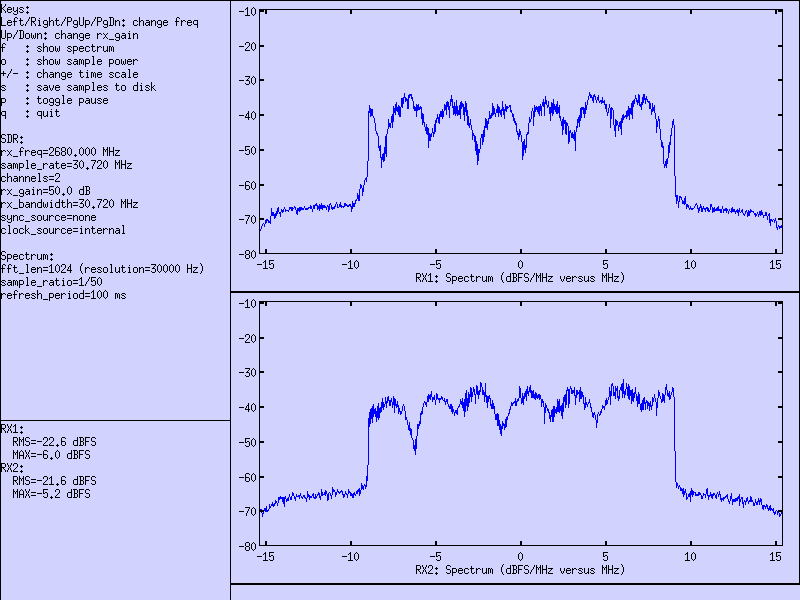
sdr_spectrum is interactive and allow actions during runtime:
keysavailable keys are indicated in the left side text area.
left mouse buttonselect a range and the X-Y values are displayed on the bottom of the graph.
right mouse buttonin spectrum mode, highlight a range and get a measure of the power inside the range.
sdr_play is an I/Q file player. Several channels can be played
at the same time and they can be time synchronized on an external
clock. One file must be provided per channel. The following options
are available:
-hhelp
-args strset the device arguments (default="dev0=/dev/sdr0")
-tx_freq freqset the TX frequency in Hz (default=2400000000)
-rate rateset the sample rate to ’rate’ Hz (default=23040000)
-tx_gain gainset the TX gain in dB (default=70)
-channels cset the number of channels to ’c’ (default=1)
-tx_bw bwset the analog transmit bandwidth in Hz (default=same as sample rate)
-loopplay the file in loop
-sync sourceset the sync source to ’source’ (none, internal, gps, external) (default=none)
-clock sourceset the clock source to ’source’ (internal, external) (default=internal)
-time_offset noffset the output by n samples (default=0)
The sample files should contain the I/Q values as little endian 32 bit floats, in I/Q order. The sample values should be between -1 and 1.
sdr_test is a general diagnostic tool for SDR boards.
usage: sdr_test [options] cmd [args...]
-hhelp
-c device_numselect the SDR device number (default=0)
-d channelselect the device channel (default = 0). useful for CPRI boards.
dma_loopback_test [n][sec]test DMA loopback on 1 or n devices for sec seconds (def: 10)
rfic_tx_test sample_rate freq tx_gain waveform [tone_freq/ofdm_bw]test RFIC TX (freq in Hz, tx_gain in dB from 0 to 90)
waveform can be:
 zero for no signal
 prbs for PRBS simulation,
 tone for CW at specified offset from center freq (default = 7.68e6)
 ofdm for OFDM simulation on specified bw (default = auto)
flash_checkverify checksum of code in onboard FPGA.
flash_reloadreload FPGA code from onboard flash
gps_readGPS read test (best with GPS antenna)
ledblinks onboard led during 5 seconds for identification
synchro_set [src]Set the source for PPS synchronisation
 0=internal
 1=GPS
 2=slave
 3=ext PPS
 4=CPRI
 5=ext CLK
synchro_stateShow current status of clock and synchro source for SDR device
Example:
 sync_source = 0 (internal)
 pps_locked = 1
 clock_source = 0 (internal)
 clock_pll_locked = 1
versionShow SDR device Hardware and firmware information
Example:
 Board ID:         0x4b01
 Board master:     0x0
 Board revision:   0x0
 FPGA revision:    2022-06-07 16:29:58
 FPGA status:      operational
 Software version: 2022-02-25
dump_infodump fpga and RF chip information (similar to sdr_util version)
Example:
PCIe SDR TRX driver 2022-02-25
PCIe RFIC /dev/sdr0@0:
  Hardware ID: 0x4b01
  DNA: [0x107149909461141596]
  Serial: ''
  FPGA revision: 2023-06-27  15:31:17
  FPGA vccint: 1.00 V
  FPGA vccaux: 1.79 V
  FPGA vccbram: 1.00 V
  FPGA temperature: 42.6 °C
  AD9361 temperature: 18 °C
  AGC: Off
  Sync: internal (locked)
  Clock: internal (locked)
  Clock tune: -0.7 ppm
  NUMA: 0
  DMA: 1 ch, 64 bits, SMem index: On
  DMA0 TX_Underflows: 65535  RX_Overflows: 65535
  PCIe bus: bus=0xb4 FPGA PCI gen2 x1 (4.0Gb/s)   OK
gpio 0|1 [value]Get or set the signal available on GPIO points on the board
See gpio0 and gpio1 in chapter TRX driver configuration options;
The PCIe SDR board can be used in other projects with its C API. The C
API allows to send and receive I/Q samples and to change the various
parameters (frequency, sample rate, bandwidth, gains, ...). The
Amarisoft TRX driver, sdr_play and sdr_spectrum are
built using this API.
The C API is described in libsdr.h. The corresponding Linux x86_64 dynamic library is libsdr.so.
Amarisoft does not provide any support for this API and can modify it without notice.
The following figure depicts the location and functionality of each connector in the PCIe board.
Figure 6.1
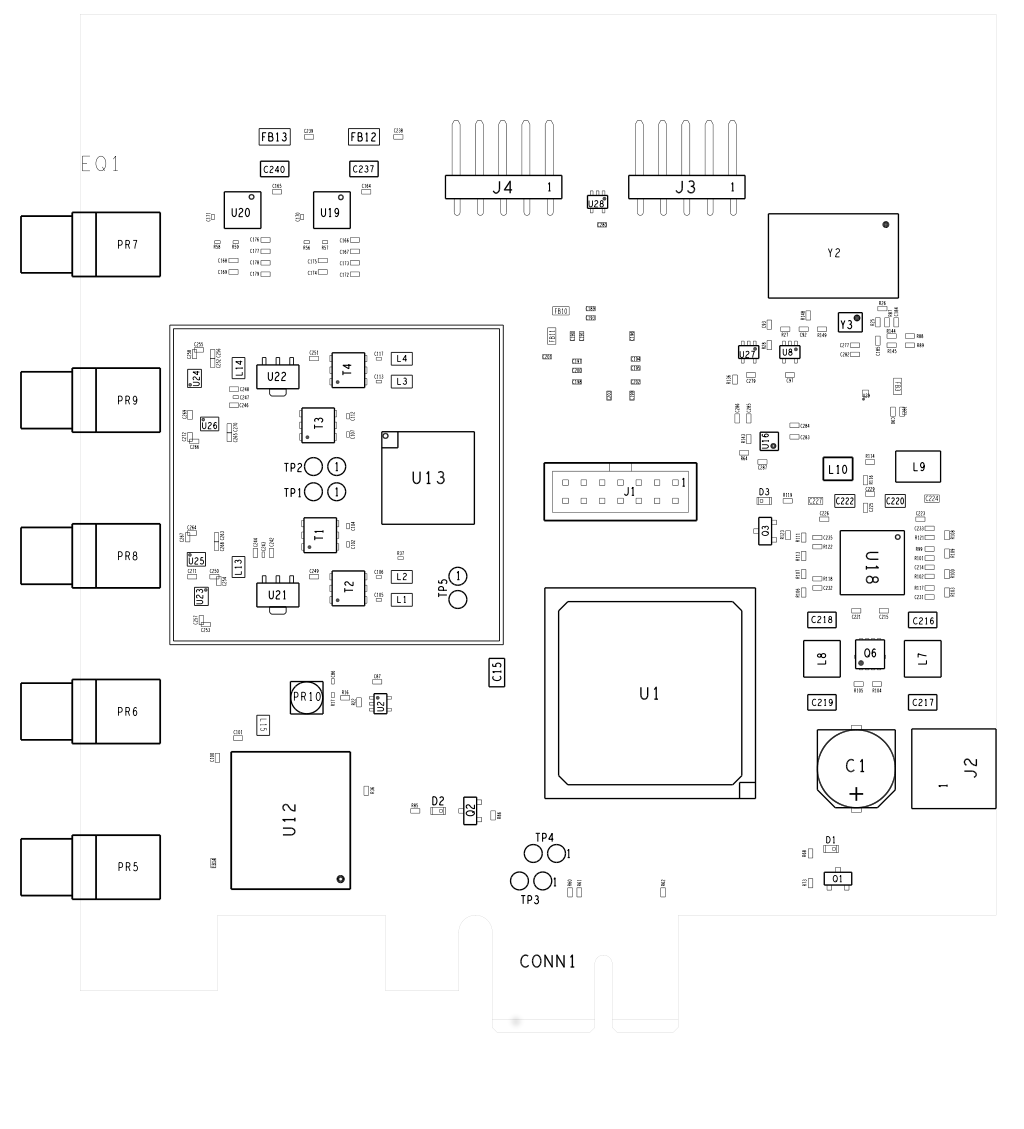
Figure 6.2
See Figure 6.1 for the location.
On Figure 6.2, the connector names are:
PR7TX2 (and RX2 for TDD)
PR9RX2 (for FDD)
PR8RX1 (for FDD)
PR6TX1 (and RX1 for TDD)
PR5GPS
OUT connector (J4):
1PPS_OUT
2REFCLK_OUT_N
3REFCLK_OUT_P
4,5GND
PPS_OUT is a LVCMOS 3.3V output.
REFCLK_OUT is a standard LVDS signal with AC coupling.
IN connector (J3):
1PPS_IN
2REFCLK_IN_N
3REFCLK_IN_P
4,5GND
PPS_IN is a LVCMOS 3.3V input (> 3.3V input is not accepted).
REFCLK_IN is a standard LVDS signal with 100 ohm impedance and AC coupling.
This reference clock is 38.4 MHz when used to synchonize between SDR boards.
It can also accept a 10.0 MHz reference clock (auto detect).
5 or 4 pin USB2 motherboard PC cables can be plugged in J3 and J4.
When using a 4 pin connector, pin 5 can be left unconnected.
MMCX input connector for external PPS source
50 ohms.
CMOS, positive pulse.
JTAG connector:
1,3,5,7,9,11,13GND
2VCC (3.3V)
4JTAG_TMS
6JTAG_TCK
8JTAG_TDO
10JTAG_TDI
12,14NC
See Figure 6.2 for the location. These pins are 3V3 CMOS output, they are driven high when RF port is in TX mode. They can be used to signal external RF circuitry in TDD mode.
TP3see gpio0 option in chapter TRX driver configuration options;
default value = rf_dts1 (TDD switch for TX1 port)
TP4see gpio1 option in chapter TRX driver configuration options;
default value = rf_dts2 (TDD switch for TX2 port)
Maximum RMS TX Power versus RF frequency, measured on OFDM bandwidth = 20MHz.
Also Peak dBm tone power, about 12dB higher due to average peak/RMS ratio.
Both were measured using sdr_test rfic_tx_test with ofdm and tone options.
(sdr_test version dated after November 2024 needed for actual maximum range).
Actual power reached may vary by a few dBm because of hardware variations.
| RF Frequency (MHz) | OFDM (dBm/MHz) | OFDM (dBm) | Tone (dBm) |
|---|---|---|---|
| 500 | -10.0 | 3.0 | 14.5 |
| 1000 | -10.0 | 3.0 | 14.5 |
| 1500 | -14.0 | -1.0 | 12.0 |
| 2000 | -15.0 | -2.0 | 10.0 |
| 2500 | -15.5 | -2.5 | 10.0 |
| 3000 | -17.5 | -4.5 | 7.5 |
| 3500 | -17.5 | -4.5 | 7.5 |
| 4000 | -18.5 | -5.5 | 6.5 |
| 4500 | -22.0 | -9.0 | 2.0 |
| 5000 | -27.5 | -14.5 | 0.0 |
| 5500 | -31.0 | -18.0 | -4.0 |
| 6000 | -31.0 | -18.0 | -4.0 |
SDR driver implements the trx remote API.
Message definition:
commandOptional string. Can be:
Exemple:
{
    "message": "trx",
    "command": "clock_tune"
}
Here are the additional request and response field depending on command value:
Request fields:
offsetOptional number. If command is clock_tune, defines the clock drift to set in ppm.
trx_sdr is copyright (C) 2012-2024 Amarisoft. Its redistribution
without authorization is prohibited.
trx_sdr is available without any express or implied warranty. In
no event will Amarisoft be held liable for any damages arising from
the use of this software.
For more information on licensing, please refer to license.pdf file.